Tower of Hell Thumbnail Maker
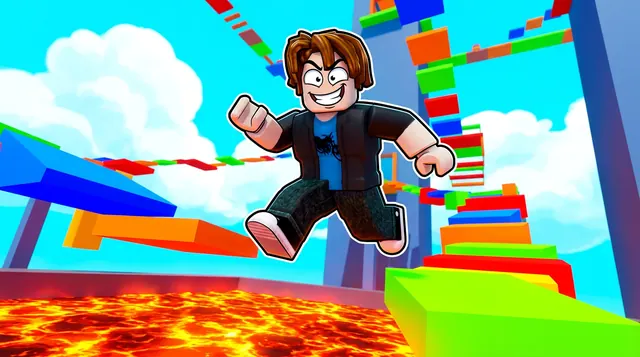
A Tower of Hell thumbnail is colorful and challenging — a towering obby, lava below, tricky jumps, and a determined climber. BloxGFX generates that vibrant parkour look from a prompt in seconds: describe the tower, the obstacles, and the climb, then download a click-ready 1920×1080 thumbnail.
Updated · By the BloxGFX team — Roblox creators.
3 free credits to start · no credit card
Roblox thumbnails made with BloxGFX
The first one was generated in BloxGFX from the example Tower of Hell prompt on this page. The other two were made for other Roblox games.


How to make a tower of hell thumbnail with AI
- 1Open the BloxGFX generator and pick the 16:9 thumbnail format.
- 2Describe your Tower of Hell scene — try a prompt like "roblox character leaping across a colorful obby tower above glowing lava, dramatic height, intense jump, bright neon obstacles".
- 3Optionally upload a reference image (your avatar, or a screenshot from Tower of Hell) to guide the AI.
- 4Generate, then refine with edit prompts until it pops at search-result size.
- 5Download the 1920×1080 PNG and upload it to your experience on the Creator Hub.
Tips for better results
- Height and danger sell it — a tall obby, lava below, and a mid-jump moment capture the Tower of Hell challenge.
- Bright neon obstacles and a clear focal climber make the difficulty and energy read instantly.
- Lead with emotion and action — a bold focal character and high contrast win the click.
Tower of Hell thumbnail prompt ideas
Paste one into the generator and tweak the details to match your video or update.
Hardest section
roblox player mid-leap between tiny neon platforms high above the clouds, dizzying drop below, intense focus
Reaching the top
roblox player reaching the glowing summit of a giant colourful tower, confetti, triumphant pose, sky background
Fail
roblox player falling from a towering obby with a shocked face, platforms spinning above, comic motion lines
Tower of Hell thumbnail style guide
- Colour palette
- Bright neon platform colours against a clean sky gradient.
- Focal subject
- The height: one player and a big drop.
- Avoid
- Flat side-on shots that hide the height — tilt the camera so the fall feels real.
FAQ
How do I make a Tower of Hell thumbnail?
Describe the obby in BloxGFX — the tower, lava, and a mid-jump moment — and it generates a finished 1920×1080 thumbnail in seconds.
Can I match the colorful obby style?
Yes — ask for bright neon obstacles, dramatic height, and glowing lava, and the AI builds that vibrant parkour look.
What makes a Tower of Hell thumbnail exciting?
Height and danger — a tall neon obby, glowing lava below, and a climber caught mid-jump. Bright obstacles and a clear focal climber sell the challenge.
Make yours in seconds
Built by Roblox devs, for Roblox devs. No Blender, no designer.
Try BloxGFX free