Bee Swarm Simulator Thumbnail Maker
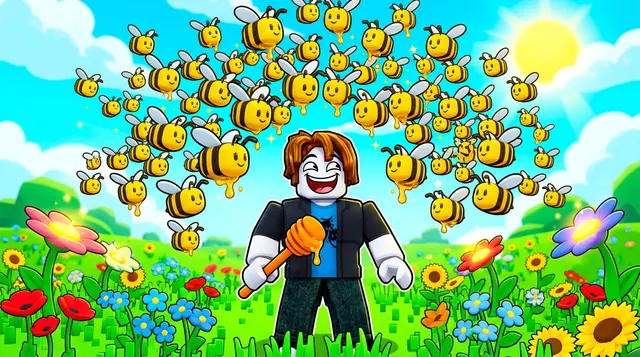
A Bee Swarm Simulator thumbnail is bright and busy — swarms of bees, golden honey, fields of flowers, and a cheerful collector vibe. BloxGFX generates that sunny look from a prompt in seconds: describe the bees, the honey, and the field, then download a click-ready 1920×1080 thumbnail.
Updated · By the BloxGFX team — Roblox creators.
3 free credits to start · no credit card
Roblox thumbnails made with BloxGFX
The first one was generated in BloxGFX from the example Bee Swarm Simulator prompt on this page. The other two were made for other Roblox games.


How to make a bee swarm simulator thumbnail with AI
- 1Open the BloxGFX generator and pick the 16:9 thumbnail format.
- 2Describe your Bee Swarm Simulator scene — try a prompt like "huge swarm of cute bees over a sunny flower field, dripping golden honey, bright cheerful colors, sparkles".
- 3Optionally upload a reference image (your avatar, or a screenshot from Bee Swarm Simulator) to guide the AI.
- 4Generate, then refine with edit prompts until it pops at search-result size.
- 5Download the 1920×1080 PNG and upload it to your experience on the Creator Hub.
Tips for better results
- Yellow and gold rule — bees, honey, and sunny fields make the thumbnail unmistakably Bee Swarm.
- A big swarm or a giant honey payoff as the focal point shows progress and grabs the eye.
- Lead with emotion and action — a bold focal character and high contrast win the click.
Bee Swarm Simulator thumbnail prompt ideas
Paste one into the generator and tweak the details to match your video or update.
New bee
rare glowing bee with sparkling wings hovering in front of a honeycomb hive, golden light, cute big eyes
Honey milestone
roblox player standing on an overflowing mountain of golden honey with a huge swarm of bees, sunny field, triumphant
Boss fight
giant cartoon creature attacking a flower field while a swarm of bees counterattacks, bright cheerful action
Bee Swarm Simulator thumbnail style guide
- Colour palette
- Honey gold, sunflower yellow and fresh greens.
- Focal subject
- The swarm or one special bee, big and close.
- Avoid
- Tiny bees spread across a wide field; at small sizes they disappear.
FAQ
How do I make a Bee Swarm Simulator thumbnail?
Describe the scene in BloxGFX — the bees, honey, and flower field — and it generates a finished 1920×1080 thumbnail in seconds.
Can I feature a specific bee or item?
Yes — name it in your prompt and add a reference image so the bee, egg, or item matches what you're showing.
What colors work for a Bee Swarm Simulator thumbnail?
Yellows and golds — bees, dripping honey, and a sunny flower field. A big swarm or a giant honey payoff as the focal point shows off progress.
Make yours in seconds
Built by Roblox devs, for Roblox devs. No Blender, no designer.
Try BloxGFX free