Roblox Shirt Template
A Roblox classic shirt template is the 585×559 px layout that maps a flat image onto the avatar's torso and arms. Download the blank template below, paint your design onto the front, back, and arm panels, then upload it as a Shirt in Roblox Studio. You can preview how it wraps on a 3D avatar before you pay the upload fee, or generate shirt art from a prompt with BloxGFX.
Updated · By the BloxGFX team — Roblox creators.
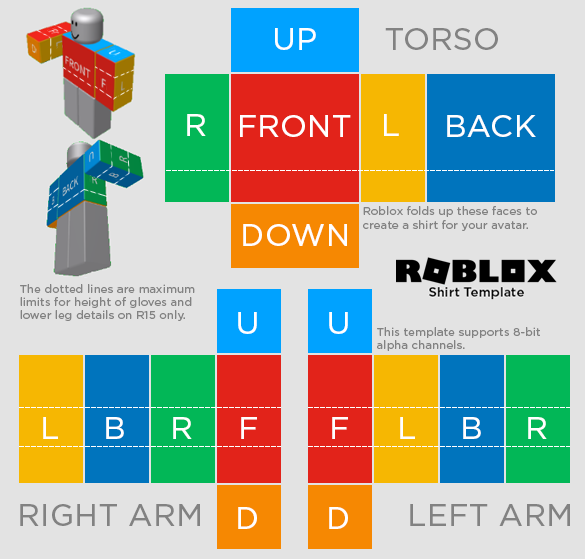
Official Roblox classic shirt layout — paint inside the guide panels.
3 free credits to start · no credit card
How to make a shirt template with AI
- 1Download the blank 585×559 shirt template above.
- 2Open it in any editor and paint your design onto the front, back, and arm panels — keep art inside the guide outlines.
- 3Export a flat 585×559 PNG (no transparency needed on the colored areas).
- 4Preview it on a 3D avatar with the free Clothing Preview tool to check the seams before you pay.
- 5In Roblox Studio, upload it as a Shirt (or via the Creator Hub) and pay the upload fee.
Tips for better results
- Mind the seams — the left/right edges of each panel wrap around the body, so designs should line up at the borders.
- Preview before you pay: uploading clothing costs Robux, so check the wrap on a 3D avatar first.
- No design skills? Describe the shirt to BloxGFX and generate the artwork, then drop it onto the template.
FAQ
What size is a Roblox shirt template?
The classic shirt template is 585×559 pixels. Download the blank layout above, paint inside the guide panels, and export a flat 585×559 PNG.
Is the Roblox shirt template free?
Yes — the blank template is a free download. Roblox charges a Robux fee only when you upload your finished shirt to the platform.
How do I preview my shirt before uploading?
Use the free Clothing Preview tool: upload your template and see it wrapped on a rotatable 3D Roblox avatar, so you can fix seams before paying to upload.
Can AI design my Roblox shirt?
Yes — describe the shirt to BloxGFX's texture generator and it creates artwork you can place onto the 585×559 template.
Make yours in seconds
Built by Roblox devs, for Roblox devs. No Blender, no designer.
Try BloxGFX free