Roblox Pants Template
A Roblox classic pants template is the 585×559 px layout that maps a flat image onto the avatar's legs and hips. Download the blank template below, paint your design onto the leg panels, then upload it as Pants in Roblox Studio. Preview how it wraps on a 3D avatar before you pay the upload fee, or generate pants art from a prompt with BloxGFX.
Updated · By the BloxGFX team — Roblox creators.
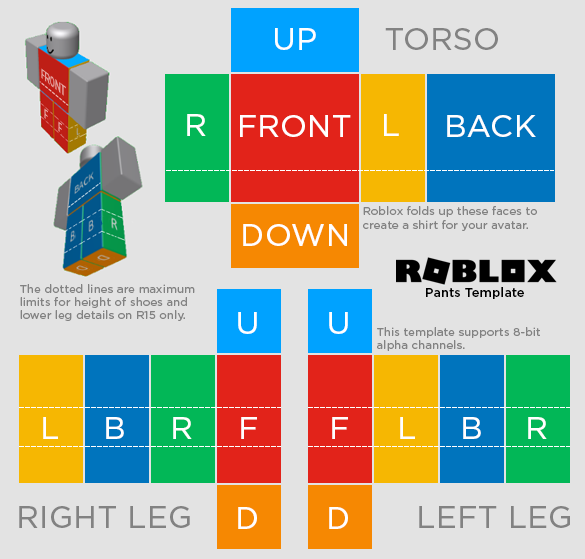
Official Roblox classic pants layout — paint inside the guide panels.
3 free credits to start · no credit card
How to make a pants template with AI
- 1Download the blank 585×559 pants template above.
- 2Paint your design onto the leg and hip panels — keep art inside the guide outlines.
- 3Export a flat 585×559 PNG.
- 4Preview it on a 3D avatar with the free Clothing Preview tool to check the seams.
- 5In Roblox Studio, upload it as Pants (or via the Creator Hub) and pay the upload fee.
Tips for better results
- Line up your design at the panel edges so the legs wrap seamlessly.
- Preview before you pay — uploading clothing costs Robux, so verify the wrap first.
- Generate the artwork with BloxGFX if you'd rather describe the pants than paint them by hand.
FAQ
What size is a Roblox pants template?
The classic pants template is 585×559 pixels — the same size as the shirt template. Paint inside the guide panels and export a flat 585×559 PNG.
Is the Roblox pants template free?
Yes — the blank template is a free download. Roblox charges a Robux fee only when you upload the finished pants.
How do I preview my pants before uploading?
Use the free Clothing Preview tool to see your template wrapped on a rotatable 3D Roblox avatar and catch seam issues before paying.
What's the difference between a shirt and pants template?
Both are 585×559, but they map to different body parts — shirts cover the torso and arms, pants cover the hips and legs. They're uploaded as separate clothing items.
Make yours in seconds
Built by Roblox devs, for Roblox devs. No Blender, no designer.
Try BloxGFX free