Dress to Impress Thumbnail Maker
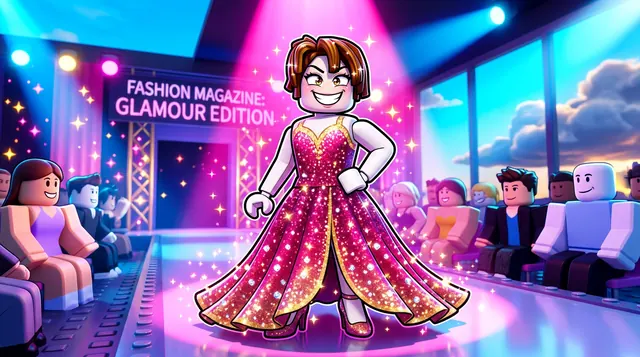
A Dress to Impress thumbnail is glamorous and fashion-forward — stylish outfits, a runway or vanity backdrop, and a confident model pose. BloxGFX generates that chic, glossy look from a prompt in seconds: describe the outfit, the theme, and the glam, then download a click-ready 1920×1080 thumbnail.
Updated · By the BloxGFX team — Roblox creators.
3 free credits to start · no credit card
Roblox thumbnails made with BloxGFX
The first one was generated in BloxGFX from the example Dress to Impress prompt on this page. The other two were made for other Roblox games.


How to make a dress to impress thumbnail with AI
- 1Open the BloxGFX generator and pick the 16:9 thumbnail format.
- 2Describe your Dress to Impress scene — try a prompt like "stylish roblox model in a glamorous gown on a runway, pink spotlight, fashion magazine vibe, confident pose, sparkles".
- 3Optionally upload a reference image (your avatar, or a screenshot from Dress to Impress) to guide the AI.
- 4Generate, then refine with edit prompts until it pops at search-result size.
- 5Download the 1920×1080 PNG and upload it to your experience on the Creator Hub.
Tips for better results
- Fashion is the focus — a standout outfit and a confident pose on a runway or vanity backdrop read as Dress to Impress.
- Pink glam lighting, sparkles, and a clear theme (prom, Y2K, fairy) make the thumbnail pop for a style-focused audience.
- Lead with emotion and action — a bold focal character and high contrast win the click.
Dress to Impress thumbnail prompt ideas
Paste one into the generator and tweak the details to match your video or update.
Theme challenge
roblox model posing on a glowing runway in a dramatic themed outfit, judges' scorecards held up, pink and gold spotlights
Glow-up
split image of a plain roblox avatar and the same avatar in a stunning couture gown, sparkle transition between them
Winning moment
roblox model holding a trophy with confetti falling on a fashion runway, five stars glowing above, glamorous lighting
Dress to Impress thumbnail style guide
- Colour palette
- Pinks, golds and soft spotlight purples — fashion-magazine glam.
- Focal subject
- The outfit, shown full-length in a confident pose.
- Avoid
- Cropping the outfit at the waist; the full look is what players want to see.
FAQ
How do I make a Dress to Impress thumbnail?
Describe the outfit and runway scene in BloxGFX — the look, theme, and glam lighting — and it generates a finished 1920×1080 thumbnail in seconds.
Can I match a specific theme or outfit?
Yes — name the theme ("Y2K", "fairycore") in your prompt and add a reference image to keep your model's look consistent.
What theme should my Dress to Impress thumbnail use?
Pick one clear theme (prom, Y2K, fairycore, met gala) and build the outfit, lighting, and backdrop around it so the round or look is obvious at a glance.
Make yours in seconds
Built by Roblox devs, for Roblox devs. No Blender, no designer.
Try BloxGFX free