How to Make a Roblox Game Icon
A Roblox game icon is the 512×512 (1:1) square that represents your experience in search and game lists. To make one, center a single, instantly-readable subject (Roblox rounds the corners), keep it high-contrast, and export at 512×512 under 1 MB. With BloxGFX you describe the icon and the AI generates it composed for the safe zone in seconds.
Updated · By the BloxGFX team — Roblox creators.
3 free credits to start · no credit card
A game icon made with BloxGFX
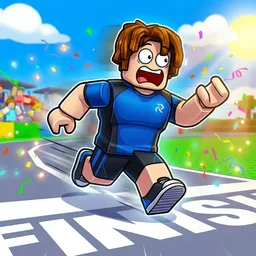
How to make a game icon with AI
- 1Pick one clear subject — a character, item, or symbol — not a whole scene.
- 2Keep the key art centered; Roblox crops the corners into a rounded square.
- 3Generate it with AI by describing the subject (or design it in Photoshop the manual way).
- 4Match your thumbnail's style and colors so your branding stays consistent.
- 5Check it reads clearly at small sizes — icons are tiny in crowded game lists.
- 6Export the 512×512 PNG and set it as your experience icon on the Creator Hub.
Tips for better results
- One subject, not a scene — an icon has to read in a thumbnail-sized square.
- Center the important detail; the corners get cropped into a rounded square.
- High contrast and a simple background help you stand out next to other games.
- Reuse your thumbnail's palette so your icon and thumbnail look like a set.
FAQ
What size is a Roblox game icon?
512×512 pixels, a 1:1 square, PNG or JPG under 1 MB. Keep the key art centered because Roblox rounds the corners.
What's the difference between a game icon and a thumbnail?
The icon is the 512×512 square that identifies your game; the thumbnail is the 1920×1080 (16:9) banner on your experience page. Most games want both.
How do I make my game icon stand out?
Use one bold subject, high contrast, and a clean background, and make sure it's readable when it's small. Matching your thumbnail's style helps too.
Can I make a Roblox icon for free?
Not on the free credits — icons need a paid plan (from $4.99/mo). New accounts get 3 free credits (one-time) for 16:9 thumbnails.
Make yours in seconds
Built by Roblox devs, for Roblox devs. No Blender, no designer.
Try BloxGFX free